
Updated on Fri, 24th of April 2026
You searched your own business name on Google and nothing came up. Or you tried to edit your listing and found yourself locked out. Either way, the calls have stopped and you need answers now.
A Google Business Profile suspension (also known as a Google My Business, or GMB, suspension) occurs when Google removes your business listing from Google Search and Google Maps, or restricts your ability to manage it — making your business invisible to anyone searching locally. The impact is not gradual. Phone enquiries drop by 60 to 80 percent within hours. Website traffic from local searches collapses. Customers find whoever shows up in your place.
Google Business Profile suspensions have hit record levels heading into 2026, with Australian businesses reporting appeal times stretching to five weeks or longer and an increasingly unforgiving automated enforcement system that has little patience for even minor technical violations.
This guide is built on real Australian reinstatement cases. It covers every major suspension type, the evidence Google actually wants, the appeal mistakes that guarantee rejection, and the techniques that consistently get profiles back online faster. Everything here is updated for 2026 policies and the significant enforcement changes that rolled out through the second half of 2025.
If you are currently suspended, start at the immediate steps section. If you want to prevent a future suspension, skip to the prevention section. If you are trying to understand what happened, read from the beginning.
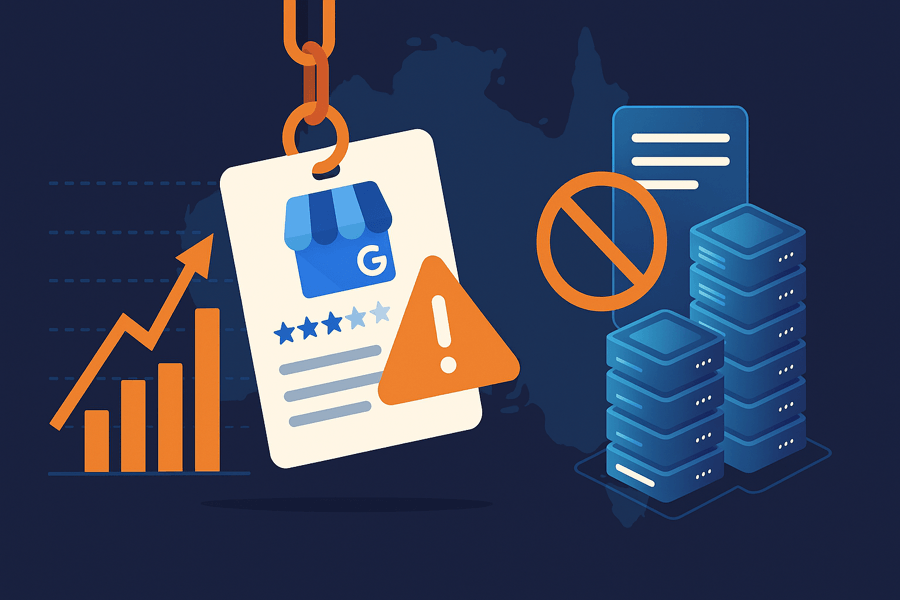
Why Australian Businesses Are Getting Suspended at Record Rates in 2026
The volume of GBP suspensions affecting Australian businesses has climbed sharply since mid-2025. Google deployed more aggressive automated enforcement updates through August and September 2025 as part of a broader push against spam listings and address manipulation. The intent was reasonable. The outcome was a hair-trigger system that catches legitimate businesses alongside actual spam.
These enforcement systems work without human review at the detection stage. A business gets flagged, suspended, and receives a vague policy violation notice in seconds. Google’s human reviewers only enter the picture during the appeal phase, which is why the appeals backlog has grown so significantly.
For detail on current wait times and how to manage your business during the appeal period, see the dedicated post on the Google Business Profile appeals backlog in Australia.
The categories most heavily targeted by the 2025 enforcement updates: home services (plumbers, electricians, landscapers), health and allied health services, legal and financial services, and real estate. These industries have historically concentrated the most spam listings, so legitimate businesses operating in them face a higher false-positive rate than average.
The numbers were shocking for 2025:
- Appeal processing time increased 900% — from 5 days to 4-5 weeks
- Weekly suspension complaints at record highs across all business sectors
- 84% of businesses struggle with delayed or unclear appeal resolutions
- Minor profile edits now trigger suspensions at alarming rates as explained by leading US Google Business Profile reinstatement (Source: agency Unsuspend Me)
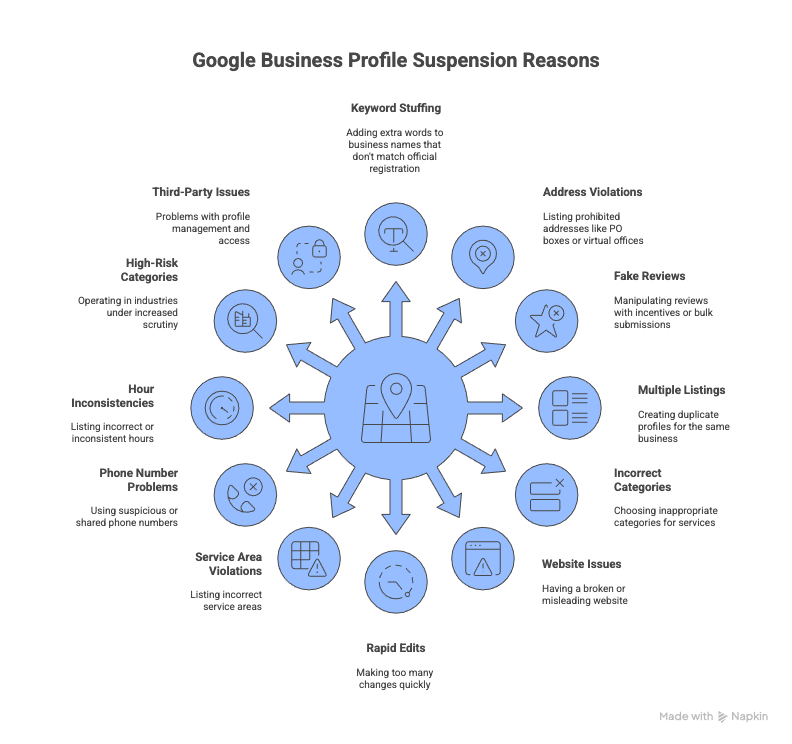
12 Most Common Google Business Profile Suspension Reasons in Australia
Most suspensions are predictable. These are the causes we see most consistently across Australian reinstatement cases.
1. Business Name Keyword Stuffing
The single most common trigger in Australia. Keyword stuffing happens when a business adds words to their GBP name that do not appear on their ABN registration, ASIC documents, or legal trading name. Names like “Smith Plumbing – Best Emergency Plumber Sydney CBD” or “Melbourne Dental – Teeth Whitening Implants Cosmetic” violate Google’s compliance requirements. Your business name on Google must match your official registration exactly. No extra words. No service descriptions. No location modifiers unless they are part of your legal name.
2. Rapid Profile Edits from the Backend
| Critical: This is the number one cause of suspension among the clients we handle. Do not change your business name, address, phone number, categories, and website URL in the same session, or even in the same week. Editing during Monday and Tuesday carries elevated risk based on patterns we observe consistently. Later in this guide there is a technique that eliminates this risk entirely. |
3. Address and Service Area Violations (2026 Rule)
Google implemented a critical service area change in 2025 that is still catching Australian businesses off guard in 2026. Businesses can no longer list entire states or “Australia” as their service area. Specify individual cities, suburbs, or postcodes, and keep your total service area within roughly a two-hour drive from your base location.
Prohibited address types include PO boxes, virtual offices without a dedicated physical presence, residential addresses listed publicly for businesses that do not serve customers at home, and coworking spaces without a permanent branded workspace. Service area businesses operating from home must hide their residential address on the profile.
4. Review Manipulation and Suspicious Engagement Patterns
Google’s detection identifies review gating (filtering out dissatisfied customers before they reach Google), incentivised reviews, coordinated campaigns where clusters of fake reviews come from the same IP range, and suspiciously uniform review language. Australian businesses in healthcare are particularly vulnerable because patient experience platforms sometimes generate patterns that Google reads as manipulation even when the underlying reviews are genuine.
5. Duplicate Listings and Third-Party Access Issues
Multiple profiles at the same address, former employees or agencies retaining owner-level access, and accounts where a connected manager account has itself been suspended for violations on a different business are all common causes. If a manager account linked to your profile gets suspended elsewhere, that suspension can flow through to your listing without any action on your part.
6. Website Quality and URL Issues
Redirect chains, social media profiles used as the primary business website, websites returning errors, and sites with content that contradicts your GBP information all create risk. Australian businesses are advised to include their ABN in their website footer as an additional compliance signal for Google’s crawlers.
7. Incorrect or Over-Stuffed Categories
Adding categories purely for SEO reach rather than accurate service description, and selecting more than three to five relevant categories, both increase suspension risk. In 2026, over-categorisation has been specifically flagged in Google’s updated enforcement notes. Your primary category should precisely describe your core business.
8. High-Risk Business Categories
Locksmiths and security services, legal practitioners, financial advisers, general practitioners, home trade services, and real estate agents all face elevated suspension rates regardless of compliance status. If your business falls into one of these categories, your documentation package for any appeal needs to be correspondingly stronger than average.
9. Phone Number Problems
VoIP numbers that cannot be independently verified, numbers shared across multiple business profiles, and numbers that do not match your website or ABN registration all create verification issues. Each location in a franchise or multi-location business needs a unique, dedicated phone number.
10. Service Area Businesses Using Residential Addresses Publicly
If you operate from home and serve customers at their location, your home address must be hidden on your profile. You must set the profile as a Service Area Business and specify the suburbs or postcodes you service. Displaying a residential address as a customer-facing business address is a direct suspension trigger.
11. Operating Hours and NAP Inconsistencies
Hours that conflict with your website, hours that have not been updated for public holidays, and inconsistent Name, Address, Phone (NAP) data across Australian directories are cumulative risk factors. Each inconsistency on its own is minor. Multiple inconsistencies together read as unreliable data to Google’s verification systems.
12. Link Violations
Following Google’s updated business profile link rules introduced in late 2025, linking to third-party booking platforms, affiliate pages, or URL redirectors in restricted profile fields is now a direct suspension trigger. Your website field must link to your own domain.
What Google Business Profile Suspension Actually Means
Hard Suspension vs Soft Suspension: Why the Difference Matters
These are not the same problem and they require different responses.
A hard suspension wipes your listing from Search and Maps entirely. Anyone searching your business name, category, or service area gets nothing. This requires a formal appeal to the Google Business Profile appeals tool before your listing returns.
A soft suspension is more commonly missed. Your profile still appears for exact business name searches but shows as “unverified” with a “Claim this business” option visible to the public. You cannot edit the profile, respond to reviews, or make changes until the verification issue is resolved. Many business owners discover a soft suspension only when they try to update something and find themselves locked out, by which point the problem has been sitting there for weeks.
Account-Level vs Profile-Level Suspension
This distinction determines what you appeal first. A profile-level suspension affects a single listing and can be appealed directly through the Google Business Profile appeals tool. An account-level suspension is more serious: Google restricts the entire Google account managing the profiles, which means every profile managed from that account is suspended simultaneously.
If you wake up and find every one of your business locations suspended at once, you are almost certainly dealing with an account-level issue. You must resolve the account restriction through your Google account’s restrictions page before you can appeal individual profiles. Attempting to appeal profiles without lifting the account restriction first wastes time and typically results in automatic rejections.
The Real Cost: What Australian Businesses Lose
For businesses that depend on local search, a suspension is not an inconvenience. For many service businesses, the Map Pack is where 50 to 70 percent of local enquiries originate. Losing that presence while a competitor keeps their listing is not a fair fight. The longer the suspension runs, the more customers habituate to finding someone else.

How to Confirm Your Profile Is Suspended
Log into Google Business Manager and check for red warning banners or a “Suspended” status in your business list. “Profile under review” is Google’s softer phrasing for the same problem.
Check your registered email including promotions and spam folders. Google’s suspension notices use vague language: “Your profile violates our guidelines” typically means the automated system flagged something specific but will not say what. “Suspicious activity detected” usually points to review patterns, rapid edits, or NAP inconsistencies. “Inaccurate information” generally means a discrepancy between your profile and external data sources Google is cross-referencing.
Run the search test if you are unsure: search your exact business name, search your business address, check Google Maps directly, and search your phone number. If nothing appears or your listing shows without management options, you are suspended.

Immediate Steps When You Discover a Suspension
You have one chance to get the appeal right. The actions you take in the first hour determine whether you are reinstated in days or weeks.
Screenshot the suspension notice and save the email before touching anything else. Record your current profile information exactly as it appears. Do not make changes before identifying the cause — editing a suspended profile without understanding what triggered the suspension can compound the violation and complicate your appeal explanation.
Then audit your profile methodically against the 12 triggers above. Check your recent edit history in Google Business Manager. Compare your business name against your ABN registration character by character. Review your review pattern over the last 90 days.
| Critical: Fix the violations before you appeal. This is where most businesses fail. Submitting an appeal before correcting the underlying violation tells Google the violation is still there. Fix every identifiable issue first. Gather your documentation. Then open the appeal. |
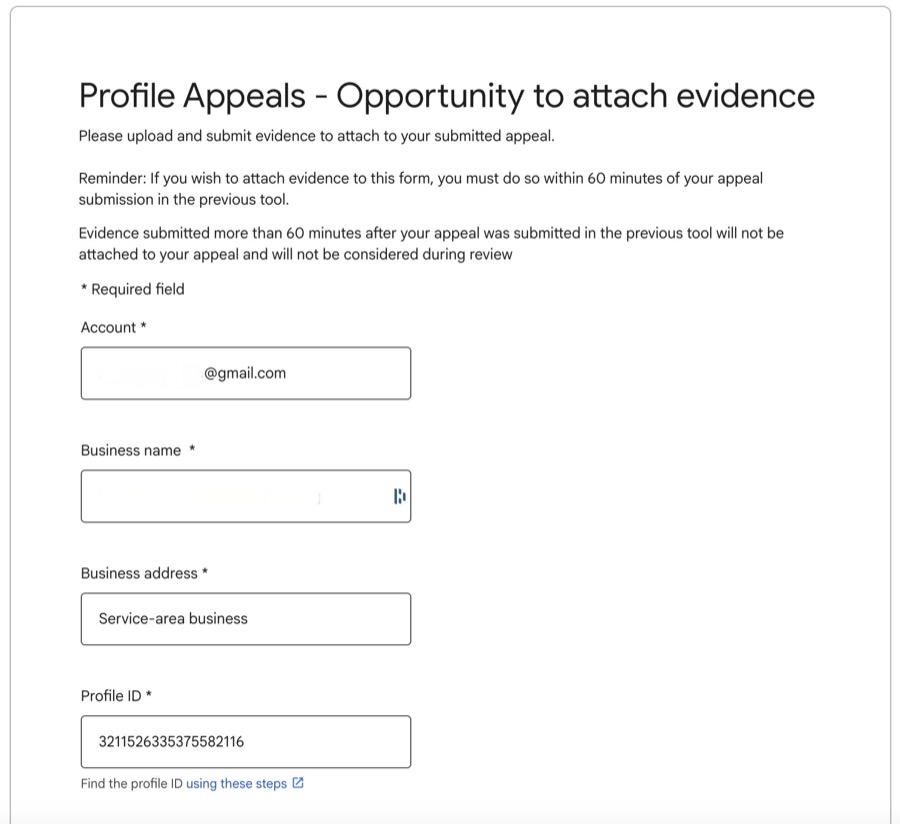
The 60-minute evidence window starts the moment you click “Submit Appeal.” Once that window closes, you cannot add anything. Have your files saved and named on your desktop before you click.
What not to do: Do not create a new Google Business Profile. Do not submit multiple simultaneous appeals. Creating a new profile while an existing one is suspended is classified as circumvention and typically results in both profiles being permanently removed.
The 2026 Australian Evidence Kit
Google introduced a new, more transparent appeal process in 2025. While this provides clearer suspension reasons, the increased volume means longer wait times.
Google’s reviewers, both automated and human, are looking for three things: official identity, physical presence, and active trading. Your ABN and ASIC registration are the foundation. Everything else supports those.
Primary Business Registration Documents
Your ABN certificate from the Australian Business Register is the foundation of any appeal. Download a current copy from abr.business.gov.au — not a year-old saved version, not a screenshot nor an extract. It must show your exact business name matching your GBP profile.
For companies, your ACN registration from ASIC carries equivalent authority. If you trade under a business name different from your legal entity name, include the ASIC business name registration to demonstrate the connection.
Address Verification
For physical premises, a commercial lease agreement showing the business name as tenant is the strongest address document available. Commercial utility bills at the business address, council rates notices, and business insurance certificates at the premises address all support the case.
For service area businesses operating from home, residential utility bills matching your ABN-registered address combined with business insurance showing the same address form an acceptable evidence package — but the address must be hidden on your public profile and the profile must be set as a Service Area Business.
Industry-Specific Australian Licences
| Important: Industry-specific licences are not optional for high-risk categories. Appeals from healthcare, legal, or financial businesses without the relevant professional registration documents are typically rejected regardless of how strong the general business documentation is. |
• Healthcare professionals: AHPRA registration certificate and relevant practising permits.
• Legal practitioners: state Law Institute or Law Society practising certificate and court admission documentation.
• Financial services: AFSL (Australian Financial Services Licence) or ASIC credit licence.
• Trade services: relevant state-based trade licence (electrical, plumbing, building, or security).
Additional pictures
For storefront businesses: Provide if possible a picture showing both the street number and the front door of your office or store with branding on it. If you cannot provide such a shot, provide different pictures showing the street number, the front door or anything with signage on it as well as a picture of your office of the inside of the building with branding or signage on it.
For service area businesses: Provide a picture of a branded vehicle showing your tools and equipement. If you do not have a branded vehicle, provide pictures of branded clothing, pictures of business cards, commercial brochures or recent client invoices.
Video Verification: Google’s Increasingly Required Step in 2026
Google has increasingly replaced the postcard verification system with video verification requirements, particularly for new claims and reinstatement appeals in high-risk categories. Not all businesses will face this, but it is now common enough that you should be prepared.
If asked for video verification: film a continuous, unedited, single-take walkthrough under two minutes. Start outside at street level and film the street sign and your building number or signage. Unlock the door on camera, which demonstrates legal access to the space. Walk through your working environment and show tools, equipment, branded materials, or anything that demonstrates active business operation. No cuts. No filters. No editing. Google’s automated review flags edited video as suspicious.
For home-based service area businesses, film your dedicated workspace, any branded vehicle, and business materials or equipment that demonstrate active trading.
Do not talk over the video, keep it short and to the point and avoid jittery and low quality shots!
The 60-Minute Evidence Window
The moment you click “Submit Appeal” in the Google Business Profile appeals tool, a timer starts. You have exactly 60 minutes to click “Add Evidence” and upload your documents. After that, the window closes and your appeal proceeds without documentation, which sharply reduces approval chances.
Set a timer the moment you click submit. Upload up to five documents individually, or zip multiple files together. For larger evidence packages, include a Google Drive link in your written explanation. The explanation field allows 1,000 characters. State your ABN, reference each document, confirm the violations you have corrected, and request reinstatement. Keep it factual.
The Step-by-Step Appeal Process (2026)
Access the Google Business Profile appeals tool through your suspension email, your dashboard notification, or directly through the Google Business Profile support page. For a full walkthrough of submitting a Google Business Profile reinstatement request, see our dedicated guide.
1. Sign in with the Google account managing the suspended profile. If you are dealing with an account-level restriction, resolve that through your Google account’s restrictions page first.
2. Select the suspended business profile and review the stated violation reason.
3. Click “Submit Appeal” and immediately start your 60-minute timer.
4. Click “Add Evidence” before the window closes and upload your documents.
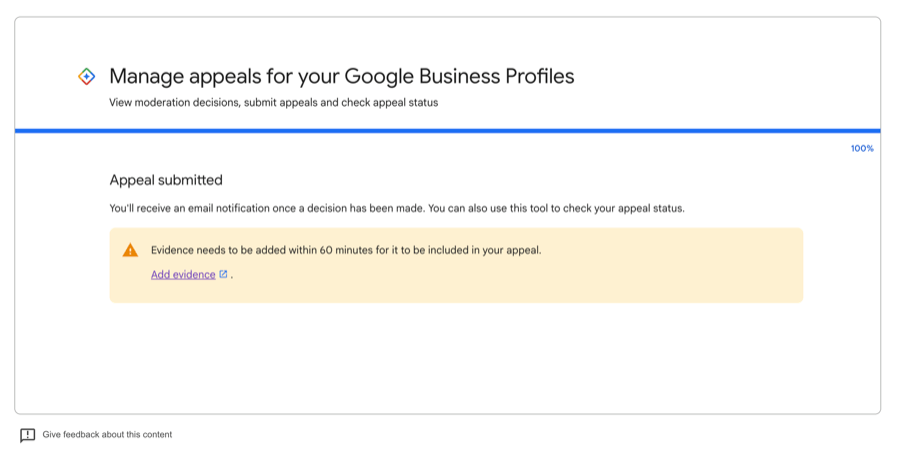
5. Complete the 1,000-character explanation: your ABN, the documents uploaded, the violations corrected, and a request for reinstatement.
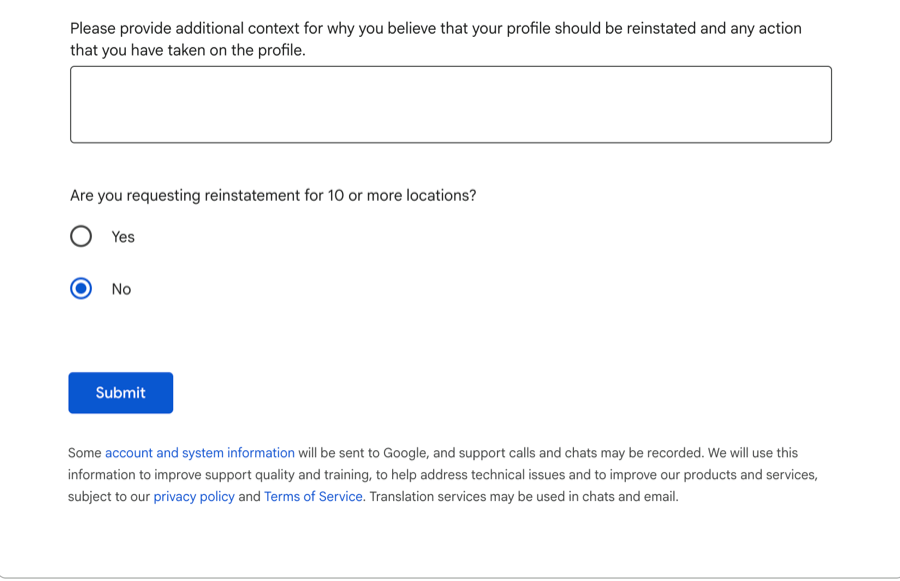
6. Submit and monitor the appeals tool for status updates: Submitted, Under Review, Approved, Not Approved, or Can’t Be Appealed.
Do not submit a second appeal while the first is under review. It resets your queue position and signals that you are operating without reading Google’s process.
Appeal Timeline Expectations for Australian Businesses
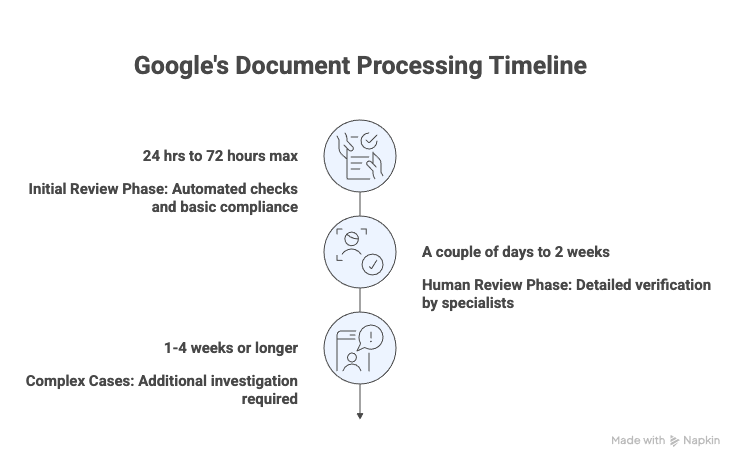
Straightforward appeals with clean documentation and standard business categories typically resolve in one to five business days. High-risk category cases or those with incomplete documentation usually take two to four weeks. Cases that have already received a denial and are going through a second review can run four to six weeks or longer.
The factor most businesses underestimate is preparation. An appeal that arrives with complete, well-organised documentation from a profile that has already been cleaned up resolves faster than one submitted immediately after discovery. Google’s automated systems can clear a straightforward compliant appeal in under 24 hours. The same appeal with missing documents or a profile that still contains violations waits in a queue for a human reviewer.
What to Do When Your Appeal Is Denied
A denial is not the end, but it does narrow your options.
Read the denial before doing anything else. “Insufficient evidence” means your documentation package needs to be stronger. “Policy violation” without further detail typically means something in the profile has not been fixed. Whatever the stated reason, conduct another full audit before resubmitting.
Google allows one additional review after an initial denial. Submit it with new evidence you did not include the first time. Resubmitting the same package achieves nothing.
If the second review fails, the standard appeals process is largely exhausted. Post your case on the Google Business Profile Help Community with your Case ID, business type, ABN, and a clear description of the evidence you submitted. Product Experts who moderate the forum have direct channels to Google’s GBP team and can escalate legitimate cases for manual human review.
The escalation path most businesses do not know about: if you run Google Ads with meaningful monthly spend, contact your Google Ads account representative and explain that your GBP suspension is preventing location extensions and reducing the return on your ad campaigns. Most reps will submit an internal ticket giving your case visibility beyond the standard appeals queue. We have seen this path resolve cases in days that had been sitting without movement for weeks.
The Prevention Technique Most Guides Miss
| Critical 2026 Update: Do not edit any of your five core profile fields from within Google Business Manager. The core fields are your business name, address, categories, phone number, and website URL. Editing these directly from the backend triggers Google’s re-verification process, which can result in an immediate suspension. |
Instead: navigate to your Google Maps listing as a regular user, use the “Suggest an edit” feature to submit the change, and do this from a Google account with Local Guide status that is different from your management account. Then go to Business Manager, review the suggested edit when Google surfaces it for approval, and accept it.
This routes the change through a verification pathway that carries significantly lower suspension risk. It takes a few extra days. It eliminates edit-triggered suspensions almost entirely. Among the businesses we work with, this single compliance practice has removed more suspensions from our caseload than any other intervention.
Prevention Framework for Australian Businesses
Beyond the editing technique, a few consistent practices keep profiles clean.
Monthly: verify your business name matches your ABN or ASIC registration exactly, check your primary category still accurately describes your core service, confirm your website URL is loading without errors on mobile, review any user-suggested edits queued in your dashboard, and scan for new duplicate listings that may have been auto-generated by directory services.
Quarterly: cross-check your business information across major Australian directories including Yellow Pages, True Local, Yelp, Hot Frog, and White Pages. Inconsistent NAP data across these sources is a background risk factor that compounds with other issues when Google evaluates your profile. Review Google’s updated GBP guidelines given how frequently enforcement priorities shift.
For the full compliance framework including detailed checklists, see our guide on how to stay compliant with Google Business Profile guidelines in Australia.
For reviews: encourage them through natural touchpoints in your customer journey. Respond to every review within 48 hours. Never offer incentives, never filter by sentiment, and never use review generation services that cannot clearly explain their methodology. A steady flow of reviews over time signals health. A spike signals manipulation.
Stay current on Google Business Profile updates and policy changes as enforcement priorities shift regularly.
When to Use a Professional Reinstatement Service
Most legitimate businesses with straightforward suspensions can resolve the situation through a well-prepared self-appeal. Several situations genuinely benefit from professional handling.
Consider it if: your account has a history of multiple previous suspensions; your appeal has already been denied and you are unsure why; your business is in a regulated industry with complex documentation requirements; you have a multi-location or franchise structure where the suspension has hit multiple profiles; or the financial impact makes the cost clearly worthwhile. A few hundred dollars in professional fees against weeks of suppressed enquiries is often straightforward maths.
When evaluating providers: look for verifiable Australian GBP reinstatement experience, transparent process documentation, and realistic timelines. Avoid anyone guaranteeing reinstatement (that decision belongs to Google), requesting owner-level access to your profile (which creates an account hijacking risk), or promising 24-hour resolution through methods they will not describe.
For detail on what a properly structured reinstatement engagement includes, see our GBP reinstatement service page.
What to Do While You Wait: Staying Visible During the Appeal
A suspended GBP does not eliminate your entire online presence. Your website can still rank in standard Google organic results while local profile visibility is gone — just not in the Map Pack. Investing in that organic presence during a suspension is not wasted effort.
Claim or update your Bing Places and Apple Business Connect listings. Both display in map searches from Apple device and Windows browser users, both are underutilised by Australian businesses, and both take less than 20 minutes to claim and verify. For trades, Hipages carries meaningful local search volume in Australia and is worth maintaining. For professional services, Localsearch. For hospitality, Zomato.
If you have a Google Ads account, your campaigns continue running during a GBP suspension. You lose location extensions and take a performance hit, but paid search presence is not affected. This is also worth mentioning to your Google Ads rep when exploring the escalation path described earlier.
Frequently Asked Questions
How long does a Google Business Profile suspension last in Australia?
Until you successfully appeal. Straightforward appeals in 2026 resolve in one to five days. Complex cases or previously denied appeals can run four to six weeks. There is no automatic reinstatement.
Can I create a new Google Business Profile while my existing one is suspended?
No. Google classifies this as circumvention. Both profiles typically end up permanently removed.
Will my Google reviews be deleted during the suspension?
Reviews are preserved during a standard suspension and return when the profile is reinstated. In the rare case of a permanent removal, reviews are generally not recoverable.
What documents do I need as an Australian business?
At minimum: a current ABN certificate, a utility bill or commercial lease matching your profile address, and any industry-specific licence relevant to your sector. High-risk categories (healthcare, legal, financial, trades) require professional registration documents. See the Evidence Kit section for the full breakdown.
How do I contact Google about a suspended profile in Australia?
Start with the Google Business Profile appeals tool (linked from your suspension email or your dashboard). If your reinstatement request is denied, escalate to the GBP Help Community with your Case ID. If you run Google Ads, contact your account representative as an additional escalation path. You can also post on X tagging @GoogleMyBiz with your Case ID as a supplementary signal.
What if Google keeps rejecting my appeals?
After a second denial, standard appeal channels are largely exhausted. Use the GBP Help Community, the Google Ads rep escalation if you are an active advertiser, or professional reinstatement help. For detailed answers to specific suspension scenarios, see the Google Business Profile suspension FAQ.
For more specific scenarios, visit the Google Business Profile suspension FAQ.
Can I still run Google Ads with a suspended profile?
Yes. Google Ads and Google Business Profile are separate systems. Campaigns continue but you lose location extensions and take a performance hit.
How does the 2026 video verification process work?
Google increasingly requests a continuous, unedited video walkthrough under two minutes: start outside at street level, film the street sign and building number, unlock the door on camera, and show your working environment. No editing, no filters. See the Evidence Kit section for the full process.
What is the single most important thing to prevent future suspensions?
Use the frontend suggestion technique for any changes to your five core profile fields (name, address, categories, phone number, website URL). Never edit these directly from Google Business Manager. Suggest the edit from Google Maps as a Local Guide account and let the system accept it automatically.
What is the difference between a suspended and a disabled Google Business Profile?
A suspended profile has been removed from public view due to a policy violation and can be appealed. A disabled profile involves a more serious account-level action. The reinstatement process differs. For a full breakdown, see our guide on Google Business Profile disabled vs suspended.
This guide reflects Google’s policies and Australian compliance requirements as of April 2026. Google updates its guidelines regularly. Always refer to official Google documentation for the most current requirements.
Need immediate help? GBP Doctor has a 95% reinstatement success rate across Australian businesses. Contact us for a free consultation.